Create a new authorization role
The specified role is tested for the releases SAP BASIS version 700 or higher.
-
Please call the transaction PFCG and specify a role name (e.g. Z_SE_ZAUDICZ). Then select Single Role.
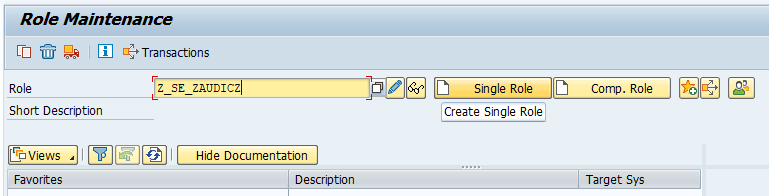
Figure: Define an authorization role
Please refer to the information displayed in the figures and steps below to define the corresponding setting for the new role.
-
Create the Role "Z_SE_ZAUDICZ" and enter a Description (optional), e.g. "Audicon SmartExporter end user - ZAUDICZ authorizations".

Figure: Description for authorization role
- Click the Save
 icon to save the role.
 -
Switch to the Authorizations tab and click the Propose Profile Names icon.

Figure: Propose profile names
-
A profile name and the corresponding text will be shown.

Figure: Generated profile name and authorization role
- Accept the suggested entries by clicking the Save icon.
Copyright © 2019 Audicon GmbH. All rights reserved.